

Stop losing clients to forgotten follow-ups.
Theo CRM brings every conversation into one timeline—so you always know who needs attention and why. Built for accountants, consultants, and advisors.
No credit card required • Setup in under 10 minutes • Cancel anytime
Log Activity
Timeline
Sent proposal addressing all scope items
Detailed proposal with pricing for Q1 implementation
Discussed needs and scope of work
45 min discovery call covering pain points
Built for professional services. Not sales floors.
Theo CRM gives accountants, consultants, and financial advisors the pipeline control and client intelligence they need—without features built for enterprise sales teams. Every feature is designed to help small professional services firms manage relationships, track revenue, and follow up with precision.
Pipeline Management
Track deals from first conversation to closed contract with customizable stages that match your sales process.
Smart Reminders
Never ghost a client. Automated follow-up reminders based on deal stage, last contact, or custom triggers.
Custom Dashboards
See revenue forecasts, conversion rates, and pipeline health in real-time—no spreadsheet exports required.
Unified Timeline
Every email, meeting, proposal, and invoice in one chronological story per client. No more detective work.
AI Helper
Automatically extract contact details, meeting notes, and action items from emails and documents.
Native Integrations
Works with Google Calendar and your existing tools. No data silos.
Theo vs. Enterprise CRMs
See why professionals switched to Theo
Built for how professional services actually work
The core features that move work forward and close more deals.
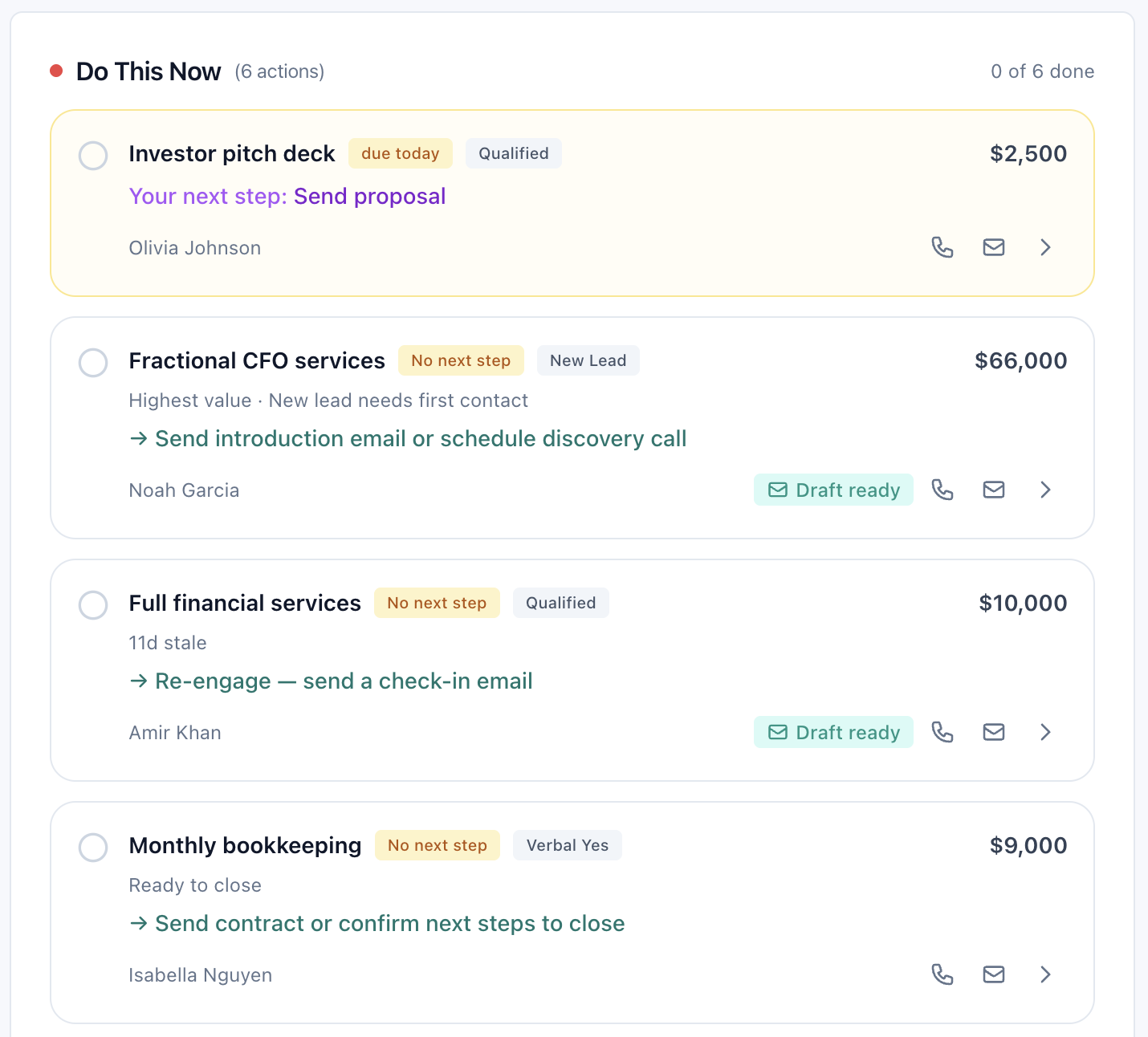
Start every day knowing exactly what matters
Today surfaces your most urgent follow-ups, upcoming deadlines, and high-value opportunities—automatically. No digging through emails or calendar. Just open Theo and know exactly what needs your attention.
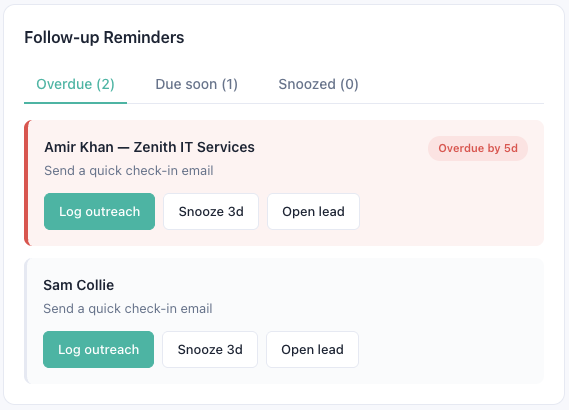
Sleep knowing nothing's falling through the cracks
Eliminate the mental load of tracking follow-ups. Smart Reminders automatically surface in your Today page based on deal stage, last contact date, or custom triggers. You set the rules. Theo enforces them. Every single time.
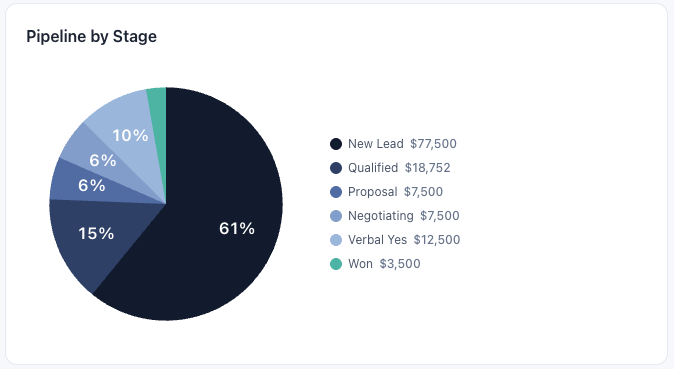
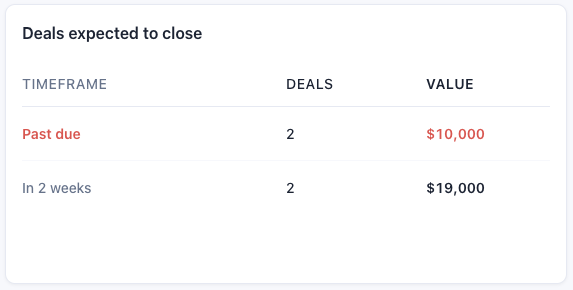
Make better decisions without drowning in data
Finally see the full picture without the full complexity. Customize widgets to track your firm's key metrics, spot trends before they become problems, and make decisions backed by real-time data—not last month's export.
Here's what our users have to say.
“Theo gives me real-time visibility into my pipeline without forcing me to log every interaction manually.”
— Jennifer P., Wealth Manager“It cut my admin time in half and I'm closing deals faster because nothing falls through the cracks.”
— Michael T., Account Director“The follow-up reminders have been a game changer during tax season when things get chaotic.”
— Sarah M., CPA See Theo in Action
Scenario 1: Monday Morning Pipeline Review
Sarah opens Theo at 9am. Her Today page shows:
- 3 overdue follow-ups (flagged in red)
- 2 proposals needing follow-up this week
- 1 deal that's been in "Negotiation" for 18 days
She clicks into her Custom Dashboard and sees:
- $240K in active pipeline
- $85K forecasted to close this month
- 45% win rate over last quarter
Total time: 90 seconds. She knows exactly what needs attention.
Scenario 2: Pre-Meeting Prep
Marcus has a call with a potential client in 10 minutes. He opens their record and scans the Timeline:
- Initial inquiry email (3 weeks ago)
- Discovery call notes (2 weeks ago)
- Proposal sent (1 week ago)
- Email asking about pricing tiers (2 days ago)
He's fully briefed without digging through email. The call starts on time, fully prepared.
Scenario 3: End-of-Quarter Forecasting
The partners need Q2 projections. Instead of pulling data from spreadsheets, they:
- Open the Pipeline Dashboard
- Filter by "Expected Close: Q2 2026"
- See $380K weighted forecast based on stage and historical win rates
- Export the report and email to stakeholders
Total time: 3 minutes.
Ready to reclaim your time?
Join professional services teams who spend just 10 minutes a day on their CRM—and never miss a follow-up.
No credit card required • Setup in under 10 minutes • Cancel anytime
Related Resources
Frequently Asked Questions
-
Theo is built specifically for solo professionals and small practices. While enterprise CRMs have hundreds of features (and high prices to match), Theo focuses on the 10 things that actually matter: contact management, follow-up reminders, pipeline tracking, and AI-powered automation. You'll spend 5 minutes a day instead of 5 hours. Read full CRM comparison >
-
Theo is purpose-built for small professional services teams—accountants, consultants, financial advisors, and similar client-focused firms. If you work primarily through email and need better pipeline visibility, Theo was designed for you.
-
Import your contacts from a CSV file, and you're ready to start tracking client activity. Most teams are managing their pipeline and logging touchpoints within 10 minutes—no complex setup or training required.
-
Theo's AI scans your workspace for client activity, suggests follow-ups, and drafts emails based on context. Every suggestion is labeled "Suggested" with a clear rationale, and you review before anything is sent. You stay in control.
-
Theo works with what you already use. Import contacts, connect Google Calendar, and your other tools, and Theo builds a unified timeline from your existing activity. No data migration. No workflow overhaul.
-
Start with a 14-day free trial—no credit card required. If it's not the right fit, you can export your data anytime. Most teams know within the first week whether Theo solves their follow-up problem.
Still have questions? Contact our team